HighFi for Mac
One download, nothing else to install. HighFi opens to Start with its own copy of everything it needs. It is not signed by Apple yet, so the first open takes one extra step, written below for macOS 26.
Download for MacIntel Mac, or prefer the terminal? The script below installs the same HighFi.
- Version
- sha256
Version, size and checksum: www.highfi.dev/downloads
To check the file: shasum -a 256 ~/Downloads/ prints the same sum.
- Open the downloaded file and drag HighFi onto Applications.
- Double-click HighFi in Applications. macOS says it could not verify that the app is free of malware. Choose Done. Do this before you go to Settings: Open Anyway shows there only for about an hour after macOS refuses HighFi.
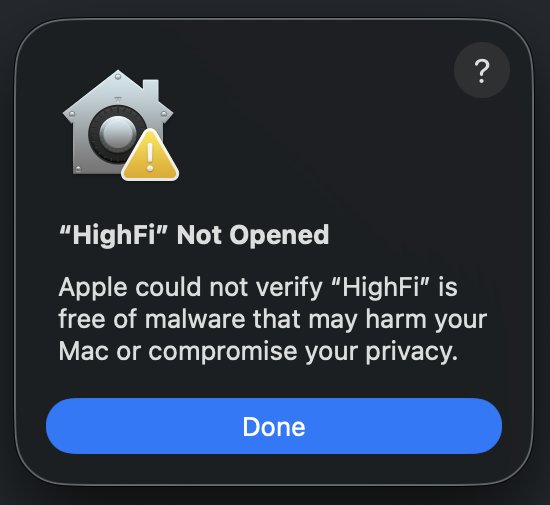
- Open System Settings, then Privacy & Security, scroll to the message about HighFi and choose Open Anyway.
Or open Privacy & Security from this page. Your browser asks before it opens System Settings.
- Confirm with your password or Touch ID. HighFi opens to Start; macOS asks only this once.
The dialogs' words move between macOS versions; these are macOS 26's.
Install by one command
Paste this into Terminal. It clones HighFi into ~/highfi, installs the app and adds a highfi command to ~/.local/bin, then opens the app at localhost:5173. You need Node 22 or later (from nodejs.org) and Git. The script only downloads: HighFi from GitHub and its packages from npm.
curl -fsSL https://www.highfi.dev/install.sh | sh
You can read the script first: it writes only to ~/highfi and ~/.local/bin/highfi. HighFi is in early access and the repository is private, so the clone needs access (ask Devin or Lenilson) and a GitHub sign-in on your machine.
- Version
v0.1.28- Checksum, sha256 of install.sh at that version
22e308347a0cab3dc9844dd5d7b813642fcca0bd4655b7c3ac8a7d895b5b185e
Both are read from the release tag when the site is built. To check the script you fetched, run curl -fsSL https://www.highfi.dev/install.sh | shasum -a 256 and compare the two.
In Terminal, step by step
- Open Terminal. Press Command and Space, type Terminal and press Return. It is in Applications, Utilities.
- Check Node. Type
node --versionand press Return. It must say 22 or later; if it says the command is not found or an older number, install Node 22 or later from nodejs.org, then open a new Terminal window. - Paste the command above and press Return. The first run installs the app's packages and takes a few minutes. If the clone is refused, sign in to GitHub with the GitHub CLI (
gh auth login, choose HTTPS) and run it again. - HighFi opens at
http://localhost:5173on its Start page, with three doors: bring your codebase, see your site first, or start from a starter. Next time, typehighfi. - Open it on your project with the same command its New project flow gives, filling in your values: the project name, the folder your Pen file is in (or an empty folder), your frontend folder, and a project id in lowercase with hyphens.
cd ~/highfi/frontend-prototype-v1 && PROJECT_NAME="<project name>" PROJECT_TEAM="mine" CATALOG_DIR="<Pen folder>" FRONTEND_DIR="<frontend folder>" DATA_DIR=data/projects/<project id> npm run dev
- Stop it with Ctrl-C in that Terminal window;
highfi stop allstops every HighFi window on this machine.
Prefer to let Claude Code do it? Paste one prompt. Every step in full, and what to do when one fails: the getting-started and troubleshooting guide.